Create customer segment Shopify: a practical, data-driven playbook for ecommerce growth
If you run a Shopify store, knowing how to create customer segment Shopify is one of the highest leverage skills you can develop. Customer segmentation lets you tailor messages, offers, and experiences to the right people at the right moments across email, ads, and on-site experiences. It also powers better ROAS, higher LTV, and stronger retention by focusing your budget and attention where they have the most impact.
McKinsey reports that 71 percent of customers expect personalized interactions and 76 percent get frustrated when that doesn’t happen, personalization leaders see outsized revenue gains and improved loyalty.
Shopify has made segmentation far easier in recent years with native customer segments, predictive signals, marketing integrations, and automation hooks. Below you’ll find a complete, research-backed guide to understanding, building, and activating segments inside Shopify, plus how to extend them with AI-driven tools to grow faster.
How to create customer segment Shopify in your admin
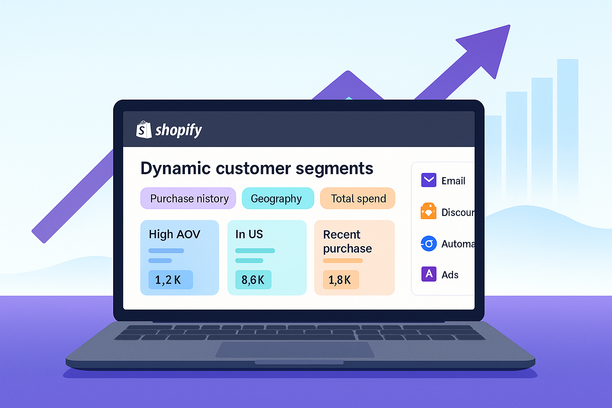
Shopify’s customer segments group people based on attributes like purchase history, geography, language, subscription status, tags, last order date, total spent, and dozens of other filters. Segments auto-update as new customers arrive and as existing customers’ behavior changes. You can use them for email, discounts, automations, and channel exports.
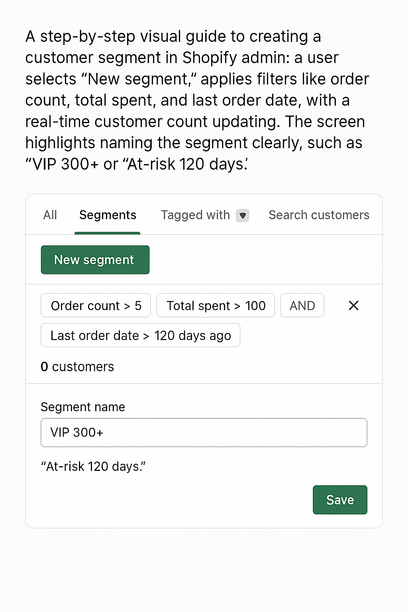
A simple workflow inside your Shopify admin looks like this:
Go to Customers and open Segments. Choose New segment.
Use filters to define who should be included. Start from templates or build custom logic with conditions like:
Order count is greater than 2
Total spent is at least 300
Last order date within 90 days
Country equals United States
Email marketing status is subscribed
As you add conditions, Shopify shows a real-time count of matching customers so you can gauge segment size and adjust logic.
Name the segment clearly so your team can reuse it, for example VIP 300+ or At-risk lapse 120 days.
When to use templates vs. custom filters
Templates are a fast path to common audiences like first-time buyers, repeat customers, high spenders, or subscribers, ideal if you’re new to segmentation. Custom filters are essential once you want precise control: combining recency and frequency, product-level behavior, geography, language, and lifecycle stages. Most teams blend both approaches, starting with a template and adding a few refinements to align with their model and goals.
What data to use and how to collect it
Shopify automatically stores core customer, order, and product data. That covers most use cases for behavioral and lifecycle segments. To build deeper insights, consider adding first-party data through:
On-site forms for preferences, interests, birthdays, and use cases
Post-purchase surveys to capture motivations and intended use
Loyalty program enrollment data and rewards behavior
Email interactions and subscription preferences
Keep consent and purpose front and center. Use data that customers knowingly provided to improve their experience, and honor unsubscribes and channel preferences across segments. The Shopify Help Center provides guidance on building compliant email marketing and managing permissions alongside segmentation: Shopify Email.
Five segmentation lenses you can use today
Demographic and firmographic. When relevant to your catalog, consolidate what you know about roles, industries, and company sizes for B2B, or household traits for DTC. Many shops rely more on behavioral data than demographics, but this lens can still help with positioning and merchandising when paired with purchases.
Geographic and language. Segment by country, state, city, or language to localize offers, currency messaging, shipping timelines, and seasonal relevance, especially powerful for campaigns tied to regional events and weather.
Behavioral. The workhorse for ecommerce. Segment by last purchase date, product categories bought, number of orders, subscription status, pages viewed, or items browsed. This is the foundation for replenishment reminders, cross-sells, and win-back journeys.
Psychographic. Use survey responses or on-site preference capture to separate hobbyists from professionals, value buyers from premium seekers, and eco-first shoppers from trend-seekers. Even a single well-chosen preference field can dramatically improve creative relevance.
Technographic and channel. Identify customers who prefer SMS, email, or social, and where they first discovered you. Use this to decide the best outreach channel and creative format for each group.
How to activate segments for email, discounts, and automation
Email. The fastest way to monetize segments is through targeted email sends and flows. Inside Customers, choose a segment and select Use segment in email. Then align content with behavior and intent:
First purchase 0 to 30 days: onboarding and education that increases product adoption and satisfaction
Repeat buyers 3+ orders: VIP previews, early access, limited releases
Category buyers, one item missing: complete the set and cross-sells
Lapsing buyers, 90 to 180 days: reminders, replenishment nudges, and reasons to return
Discounts. When you create a discount, set Customer eligibility to Specific customer segments. This enables crafted offers such as:
VIP 300+: private 20 percent access for a weekend drop
New buyers: 10 percent off second order to accelerate repeat purchase
At-risk 120 days: targeted incentive paired with value messaging
Automations. Shopify Flow can trigger workflows when a customer joins or leaves a segment. That opens up lifecycle marketing without manual effort. For example:
When a customer joins VIP 300+, notify the CX team to handwrite a thank-you card and automatically tag the profile for white-glove support.
When a customer enters Replenish 30 days and product is consumable, send a reminder campaign that predicts replenishment timing.
When a customer leaves Active 60 days and enters At-risk 90 days, trigger a win-back flow with social proof and a gentle incentive.
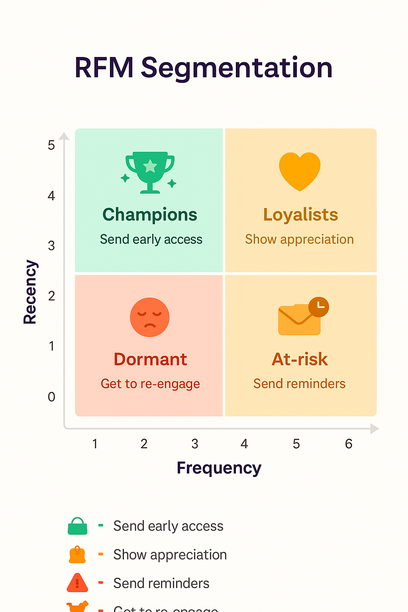
RFM stands for Recency, Frequency, Monetary. It is a time-tested method to classify customers by how recently they bought, how often they buy, and how much they spend. In ecommerce, these three signals are reliable predictors of the next purchase. A practical approach:
Score recency: 1 to 5 based on days since last order
Score frequency: 1 to 5 based on total orders
Score monetary: 1 to 5 based on total spend
Combine the scores to find Champions, Loyalists, Potential loyalists, At-risk, and Dormant. Then map messages accordingly. Champions get early access, at-risk audiences get reminders and value-driven reasons to return, dormant buyers get low-friction re-entry offers and fresh creative.
Shopify also offers predictive signals like a predicted spend tier in some contexts, which can help you forecast buying power and prioritize outreach. For hands-on marketers, this is a smart way to focus premium experiences on the customers most likely to respond, while nurturing medium-tier segments toward higher value over time. For an overview of the customer segmentation system and how to apply it in your store, start with the Help Center guide.
Extending segments to ads and building net-new audiences
The best-performing ad accounts use customer segments as the backbone of targeting. You can sync segments to ad platforms to:
Retarget high-intent visitors with dynamic product ads
Exclude recent purchasers from prospecting to reduce wasted spend
Seed lookalike audiences with high LTV buyers instead of all buyers
Shopify provides a native product for prospecting that uses aggregated commerce data to build effective ad audiences. Whether you use this or your own synced segments, a simple rule applies: your seed audience quality determines your lookalike quality. Use your highest value or most frequent repeat purchasers as the source, not a broad all customers list.
Pro tip: Keep creative aligned with segment intent. A replenishment reminder audience should see rapid, utility-focused creative. VIP buyers should see exclusivity and limited quantities. First-time buyers should see education and trust-building. These nuances increase conversion rate and ROAS.
Abandoned cart segments that actually recover revenue
Cart abandonment remains a stubborn problem for every ecommerce business. Baymard Institute’s research pegs average abandonment at roughly 70 percent across industries. Segmentation brings this number down by handling different abandonment contexts differently:
Known subscribers who abandoned a replenishable item: send a one hour reminder, then a three day reminder with a simple reason to return
Anonymous to subscriber captured via exit intent: send a Welcome plus cart reminder sequence focused on value
High AOV bundles: send social proof and a risk-reversal message such as extended returns
First-time buyers: emphasize trust, reviews, and shipping transparency
Use your abandoned checkout segment for emails, but don’t stop there. Mirror the segment in ads for personalized retargeting and keep incentives consistent across channels.
From data collection to governance
Strong segments rely on strong data. A few practical steps:
Define the minimum set of data needed to deliver materially better messages. Ask only for what you will use.
Keep data structured. Use consistent tag naming and standardize field values for country, language, preferences, and product types.
Document your segments, their purpose, and the actions they trigger. This prevents channel fatigue and overlap.
Respect consent by channel. Use email segments only for subscribers. The Shopify Email doc explains this and provides setup steps.
Where AI fits: from analysis to action
Many teams want the outcomes of AI without rebuilding their stack. This is where an AI strategy pairs nicely with Shopify-native workflows. AI consulting concepts like AI strategy, data strategy, AI implementation, AI solutions, and AI analytics translate to practical ecommerce outcomes when you apply them to segmentation:
Predictive audience discovery. Machine learning consulting often starts with identifying patterns humans miss. In ecommerce, that means uncovering micro-segments that predict repeat purchase or churn.
Creative matching. AI can help map audience segments to creative angles that historically perform best, improving CTR and conversion without guesswork.
Budget allocation. AI-assisted analytics highlight which segments drive the highest marginal ROAS so you shift spend accordingly.
If you want these benefits without heavy custom development, Kuma connects your Shopify data to an AI-powered environment that discovers predictive audience segments, builds RFM views, and syncs them to Meta Ads, Google Ads, TikTok, Pinterest Ads, Klaviyo, and HubSpot. You can also use a built-in chatbot that accesses your Shopify data to analyze performance, create graphs, and help you build high-converting audiences and campaigns, all using your real store data.
Example segments you can build this week
VIP 300+. Total spent is at least 300 and orders are at least 2. Use for exclusive drops and surprise-and-delight fulfillment.
At-risk 120 days. Last order date is 120 to 180 days ago. Use for win-back with social proof and updated product storytelling.
Category cross-sell. Bought Category A in last 45 days and has not bought Category B. Use for complementary recommendations.
New subscriber no purchase. Email subscriber is true and number of orders equals 0. Use for welcome plus first-purchase incentive.
Replenishment 30 days. Last order date is at least 30 days and contains consumable SKU. Use for reminder and subscription pitch.
High predicted value. If you use predicted spend tier where available, target high tier with premium bundles and early access.
How to measure success and iterate
Segmentation is not a one-time exercise. Measure performance by segment and keep iterating:
Engagement: open rate, click rate, on-site engagement
Conversion: add to cart rate, purchase rate, and AOV by segment
Value: repeat purchase rate, LTV growth, and margin contribution
Saturation: unsubscribe rate and frequency fatigue signals
Establish segment-level benchmarks, then A/B test creative, offers, and timing. Retire segments that no longer produce incremental value, and promote segments that consistently outperform. The result is a living portfolio of audiences that compounds performance across email and ads.
Putting it all together
Customer segmentation turns raw data into profitable action. Shopify has done the heavy lifting by centralizing customer, order, and product data and by making it simple to define audiences, send campaigns, and automate lifecycle moments:
From there, AI can accelerate the impact. With Kuma, you can discover predictive audiences, apply RFM segmentation, analyze campaigns, and sync your Shopify-built segments across Meta Ads, Google Ads, TikTok, Pinterest Ads, Klaviyo, and HubSpot without manual CSVs. If you want to turn better segmentation into better ROAS, retention, and LTV, explore how Kuma can help at kuma.marketing or contact our team for a tailored walkthrough.
CTA: Ready to operationalize segmentation across email and ads without heavy lifting? See how Kuma’s AI-powered audience segmentation and Shopify-native syncing can help you build, activate, and scale your best customers. Visit kuma.marketing to get started.
FAQ – Everything You Need to Know About Shopify Customer Segments
What is a Shopify customer segment?
A Shopify customer segment is a dynamic group of customers defined by filters like purchase history, geography, language, tags, last order date, and total spend. Segments auto-update as customers meet or no longer meet your criteria and can be used across email, discounts, automations, and ad audiences.
How do I create a customer segment in Shopify?
In your admin, go to Customers → Segments → New segment. Use templates or add filters such as “Order count greater than 2” or “Email marketing status is subscribed.” Name the segment clearly (e.g., VIP 300+ or At-risk 120 days) so your team can reuse it.
Do segments work with email, discounts, and automations?
Yes. Choose a segment and select “Use segment in email” for targeted sends and flows. When creating discounts, set Customer eligibility to Specific customer segments. With Shopify Flow, you can trigger workflows when a customer joins or leaves a segment to automate lifecycle moments.
What’s the difference between templates and custom filters?
Templates are a fast starting point for common audiences like first-time or repeat buyers. Custom filters give you precision, combining recency, frequency, monetary value, product behavior, geography, and channel preferences. Most stores start with a template and refine with custom logic.
How does RFM segmentation work in practice?
Score each customer on Recency, Frequency, and Monetary (1–5 each), then combine scores to find Champions, Loyalists, Potential loyalists, At-risk, and Dormant. Tailor messages accordingly, early access for Champions, reminders for At-risk, and low-friction re-entry offers for Dormant.
Can I use my Shopify segments in ads?
Yes. Sync segments to platforms for retargeting, excluding recent purchasers, and creating lookalikes based on high-LTV buyers. You can also use Shopify Audiences to build effective prospecting audiences from aggregated commerce data.
What data should I collect and how do I stay compliant?
Use Shopify’s core data plus first-party inputs like on-site preferences, post-purchase surveys, loyalty info, and email interactions. Collect only what you’ll use, standardize fields, document segment purposes, and respect channel-specific consent. See Shopify Email for guidance.